Table of contents
Open Table of contents
들어가며
Font가 너무 많아서, Application에서 Font를 로딩할 때 렉이 걸린다… (특히 Obsidian과 IntelliJ에서는 Program이 먹통이 된다..!) 그래서 Windows System Fonts만 남기고 다 삭제하려고 한다.
제어판 - 글꼴
글꼴 삭제의 경우 만약, 기본 글꼴만 놔두고 모두 삭제하길 원하다면, 글꼴 메뉴에서 표시되는 글꼴을 모두 선택 (Ctrl+A)하여 삭제하면, 하기와 같이 사용 중인 글꼴 및 시스템 글꼴은 삭제되지 않는다.
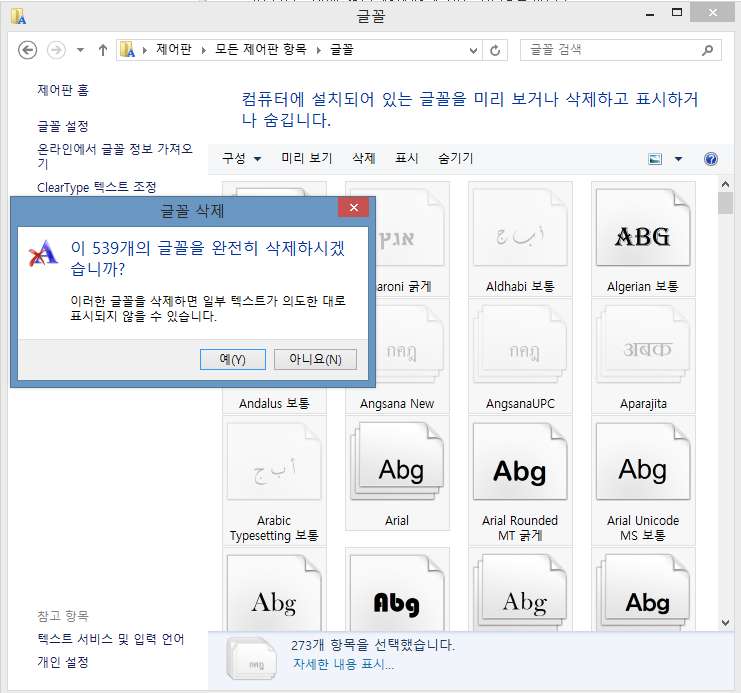
그리고 다 삭제했으면, 재부팅한다.
Windows Font Cache 초기화
Powershell을 관리자 권한으로 실행하고 하기 명령어를 입력한다.
Get-Service FontCache|Stop-Service –force
Get-ChildItem -Path C:\Windows\ServiceProfiles\LocalService\AppData\Local\FontCache -File  | foreach { $_.Delete()}
Remove-Item c:\Windows\System32\FNTCACHE.DAT
상기 명령어를 입력한 후, 재부팅한다.